MiranteSEO
Brings Search Console, GA4 and Core Web Vitals together and shows what to act on first.
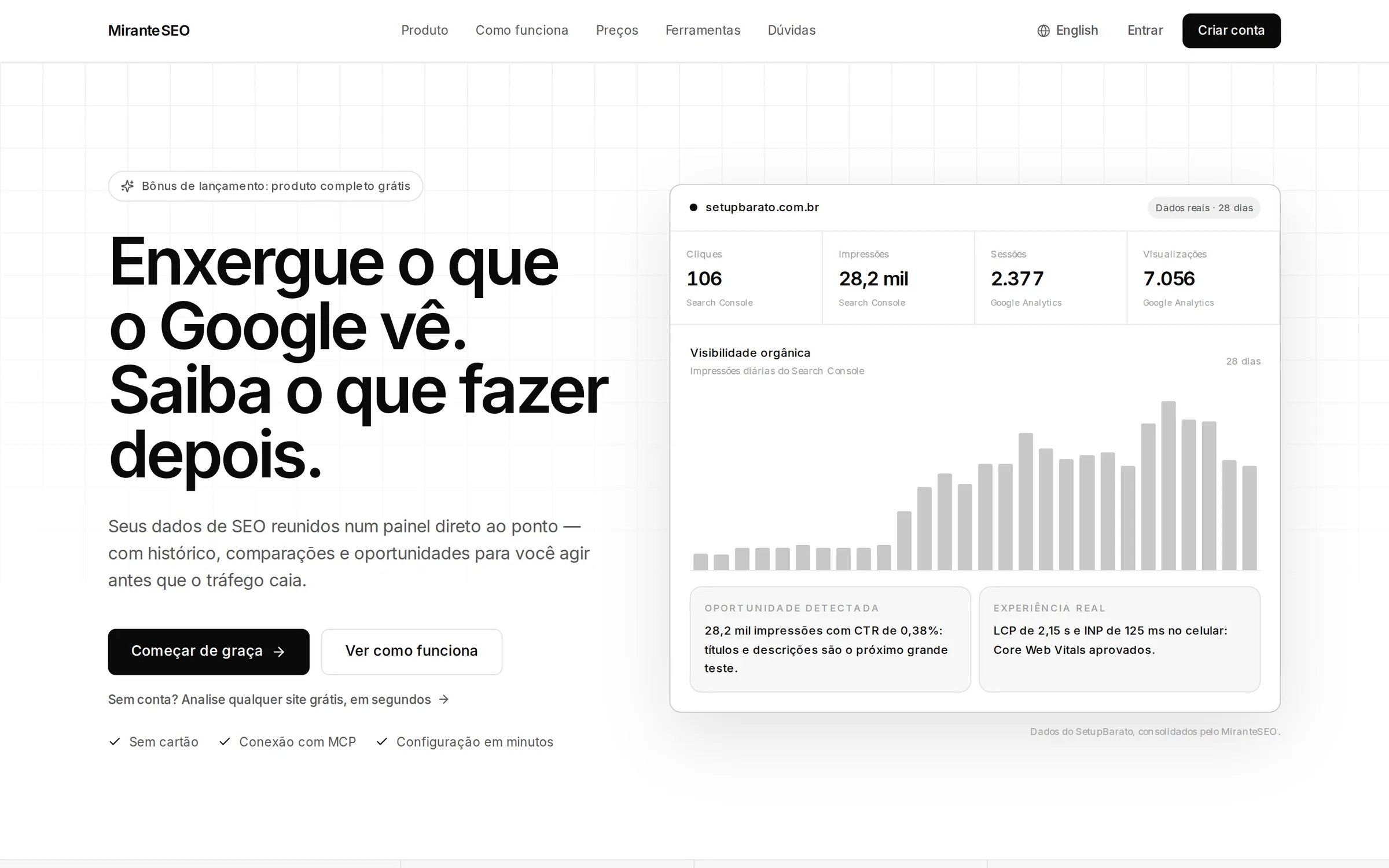
I built MiranteSEO to put in one dashboard what is usually split across Search Console, Google Analytics 4 and the Core Web Vitals report. It keeps the history, compares periods and turns the numbers into a ranked list of actions. An MCP connector brings the same data into Claude, ChatGPT and Cursor.
- Role
- Creator and developer: product, backend, Google integrations, crawler, MCP server, front-end and infrastructure
- Live since
- Aug 2026
- Stack
- Next.js, TypeScript, PostgreSQL, MCP, Docker, Tailwind CSS, Cloudflare
- MCP connector tools
- 80+
- technical crawler rules
- 49
- pages per crawl run
- 25k
- live technical tools
- 9
01MiranteSEO
The problem
A site's SEO data lives in three places: Search Console shows search, Google Analytics 4 shows behavior and CrUX shows speed as real users experience it. Combining them usually means a hand-built spreadsheet that breaks whenever something changes.
Global SEO suites solve this, but they cost too much for most Brazilian projects. Between the two extremes there was room for a straightforward dashboard, in Portuguese, with comparable history and a clear pointer to where to look first.
There was also no safe way to bring that data into AI assistants without exporting spreadsheets or handing over a Google password. The goal is to act before traffic drops, not to discover the drop in the monthly report.
02MiranteSEO
What it does
Three sources, one dashboard
Search Console by query, page and period, GA4 with channels, engagement and conversions, and CrUX Core Web Vitals on mobile and desktop. Every period is compared with the previous one, with up to 5 years of history.
Opportunity center
Drops, low CTR at a good position, lost rankings, content decay, cannibalization and CWV regressions, ranked by criticality. Each item can be dismissed or reopened.
49-rule technical crawler
Crawls up to 25k pages, compares runs and scores AI readiness without mixing up AI search bots and training bots. Nine live tools and a structured-data validator handle one-off checks.
MCP connector for AI
More than 80 tools for Claude, ChatGPT and Cursor, through OAuth in Claude or a revocable token with the miranteseo npm package. A Cursor plugin adds a rule for reading the data and two ready-made skills.
Alerts and shareable reports
Anomaly alerts, a weekly email summary and report links that open without login and can be revoked at any time. Data can also be exported to CSV.
7 free tools
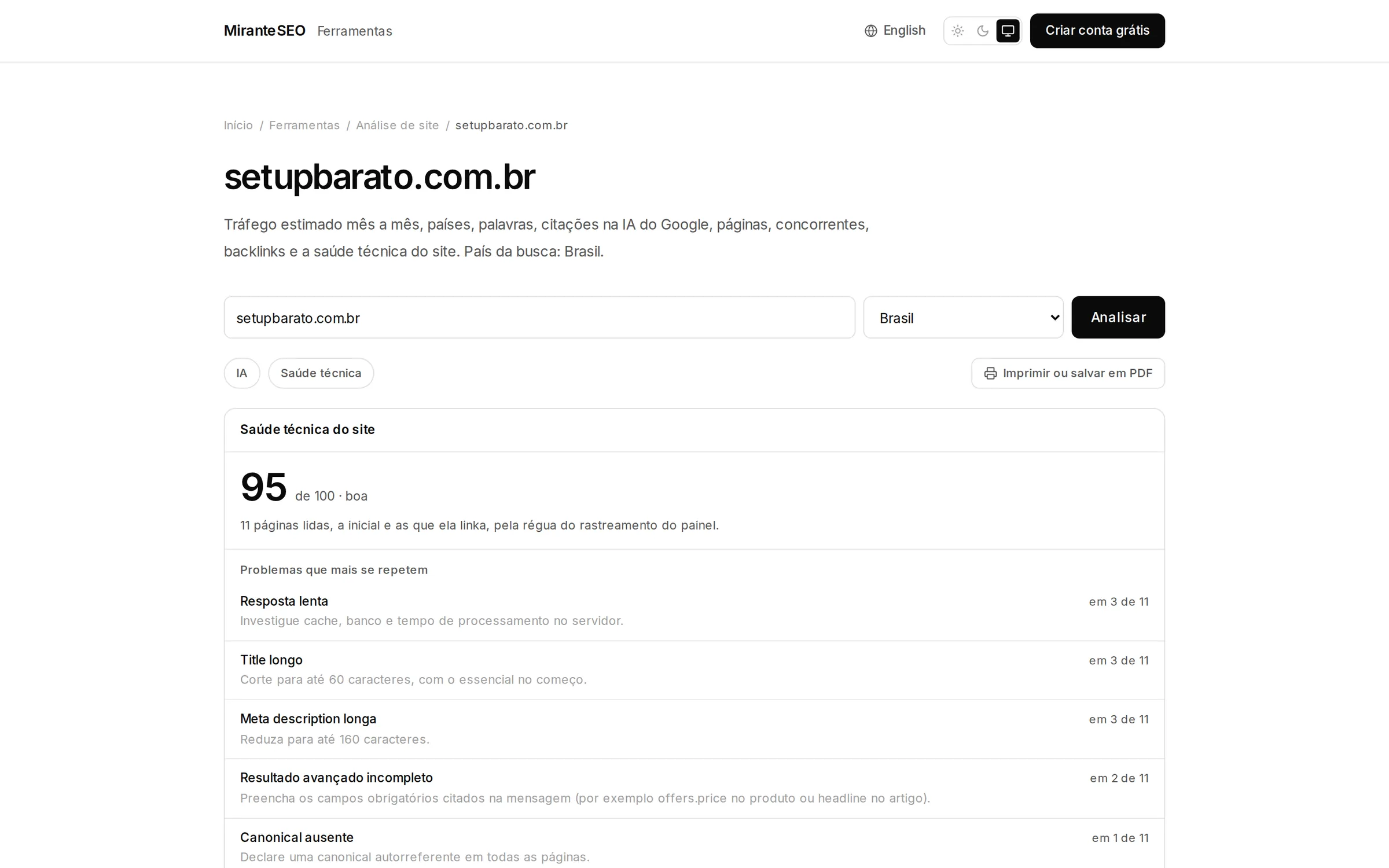
Site analysis, structured data, robots.txt, page analysis, AI visibility, backlinks and organic traffic. Open to anyone, with no account and no card.
03MiranteSEO
How it works
Connect
The user grants read-only access to a Google account and picks the properties. MiranteSEO groups Search Console, Analytics and the domain into a single project.
Sync
Collection runs in the background per organization, within Google's API quotas, and the dashboard shows when each run finished. Search Console data arrives two to three days late.
History
Data is kept for up to 5 years, and every period is compared with the previous one. Core Web Vitals come from CrUX, measured on real users over the last 28 days.
Crawl
The crawler reads up to 25k pages starting from the homepage and sitemaps, applies 49 rules and compares the run with the previous one.
Opportunities
Every few hours, a sweep crosses Search Console, Analytics, Core Web Vitals and the latest crawl, then ranks the signals by criticality. Fixed issues drop off the list on their own.
Dashboard and AI
Results show up in the dashboard, in alerts and in the weekly email. The same reads answer through the MCP connector without spending Google quota.
04MiranteSEO
Engineering decisions
Expensive calls wait for the user's yes
Connector tools sit in three tiers: reads from already-synced history, live technical checks that cost no money, and paid calls to the SERP, keyword and backlink provider. Paid tools state their price up front, and the most expensive ones show a budget and stop until the person agrees. The conversation gains a step, but an AI assistant cannot run an expensive query on its own.
A repeated question is not paid for twice
Almost everything bought from the data provider is cached: SERP results for 24 hours; keywords, domains and backlinks for 7 days. The trade-off is that an answer can be up to 7 days old. In return, asking again within that window answers instantly and is not charged again.
The assistant reads the history, not Google
Read tools answer from data that is already synced, so they don't touch the Google account's daily quota and never need anyone's password. The cost is that the freshest data is whatever the last sync brought in. The few tools that do call Google live, such as URL inspection, are labeled that way.
Database credentials never leave the server
The miranteseo npm package is just an HTTP client that forwards calls to the same MCP endpoint, authenticated with a revocable mrt_ token. In Claude, authorization goes through OAuth, and revoking cuts access immediately instead of waiting for the token to expire. That means two auth paths to maintain, with the same tools behind both.
Rate limiting doesn't require storing IPs
The free site analyzer needs no signup and doesn't record who checked what: the rate limit only counts how many analyses came from a connection that day, without storing the IP address. Each block renders as soon as its data arrives and is cached for 7 days (1 day for the technical part), so the same link can be shared. The tool gives up knowing who uses it so it can stay open to anyone.
05MiranteSEO
By the numbers
- MCP connector tools
- 80+
- Count from the site's public pages; each tool runs a single query.
- technical crawler rules
- 49
- Titles, canonicals, redirects, broken links, robots, HTTPS and AI readiness.
- pages per crawl run
- 25k
- Limit on the launch plan.
- live technical tools
- 9
- Plus a structured-data and rich-results validator.
- free public tools
- 7
- No signup, no card and no record of who checked what.
- of stored history
- 5 years
- Maximum history and retention on the launch plan.
- help center articles
- 27
- Plus 3 practical guides, in Portuguese and English.
Public numbers from the live site, as of October 28, 2026.
06MiranteSEO
Screens